The best native volume boost and sound booster for Windows
Boost your audio experience on Microsoft Edge. Our Volume Audio (Volume Boost) extension amplifies volume, improves clarity, and equalizes audio from any tab, getting the most out of your speakers.
Compatible with Microsoft Edge on Windows, macOS, Linux, and Android.
Maximum Clarity and Audio Power
Web video and music players often suffer from low volume or poor compression. By boosting the signal with Volume Audio and our powerful Sound Booster, the Dynamic Engine optimizes frequencies, delivering crisp, balanced sound that elevates listening quality without unwanted saturation.
- ✓ Professional 10-band equalizer and stereo/mono balance control.
- ✓ Dynamic engine and Clarity (Presence) to highlight voices and subtle details.
- ✓ No-Stop mode to auto-resume YouTube pauses
Why is it the best volume boost for Edge?
Edge allows native audio processing of the tab. Our audio booster applies professional-grade equalization without latency, avoiding strange noises and clipping via our Safety Limiter. Additionally, it facilitates your browsing with the No-Stop mode that automatically accepts annoying YouTube pauses.
Professional Interface. Sound tailored to you.
Take absolute control of your audio with a modern equalization panel. Adjust audio gain, the safety limiter, and customize frequencies instantly.
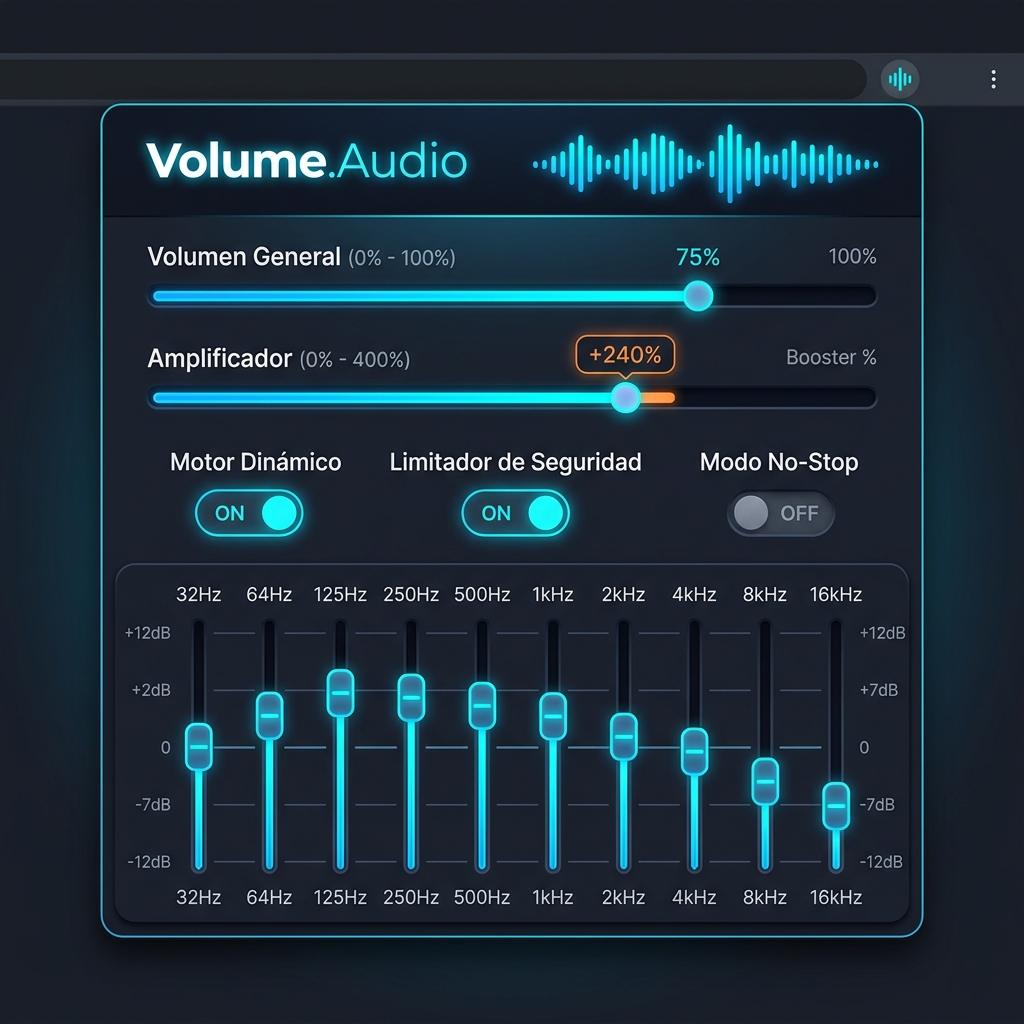

Professional 10-Band Equalizer
Adjust each of the 10 sound frequency bands independently for movies, music, or voice.
Safety Limiter
Prevents digital distortion when amplifying to the extreme, safeguarding your speaker lifespan.
Edge အတွက် စွမ်းဆောင်ရည်ဇယား
ကျွန်ုပ်တို့၏ Volume Booster Edge ရှိ အခမဲ့နှင့် ပရီမီယံ စွမ်းဆောင်ရည်များစာရင်းကို နှိုင်းယှဉ်ပါ။
| အမျိုးအစား | សមត្ថភាព | ဖော်ပြချက် | အစီအစဉ် | အခြေအနေ |
|---|---|---|---|---|
| 🚀 Amplification | အထွေထွေအသံပမာဏ | 0 မှ 15 အတိုင်းအတာအတွင်း တစ်ဦးချင်းစီ tab များအတွက် တိကျသော Linear Volume Control ကို ထိန်းချုပ်ပါ။ | FREE | ✓ အသက်ဝင်သည် |
| 🚀 Amplification | Extreme Volume Booster 1000% | အသံတိုးလွန်းသော အကြောင်းအရာများအတွက် စနစ်၏ အသံပမာဏကန့်သတ်ချက်ကို 1000% အထိ ဒစ်ဂျစ်တယ်စနစ်ဖြင့် မြှင့်တင်ပေးပါသည်။ | PRO | ★ Premium |
| 🎚️ Quality | Dynamic Engine | အသံကွဲခြင်းနှင့် အနှောင့်အယှက်များ မဖြစ်စေရန် အသိဉာဏ်ဖြင့် ချိန်ညှိထားသော ပရီမီယံအသံအရည်အသွေး။ | PRO | ★ Premium |
| 🎚️ Quality | Safety Limiter | အသံမြှင့်တင်စဉ်တွင် ဒစ်ဂျစ်တယ် အသံကွဲခြင်း (Clipping) ကို တားဆီးပေးပြီး သင့်စပီကာနှင့် နားကို ကာကွယ်ပေးသည်။ | PRO | ★ Premium |
| 🎚️ Quality | Clarity (Presence) | အသံပိုင်းဆိုင်ရာ အသေးစိတ်အချက်အလက်များနှင့် လူအသံများကို ကြည်လင်ပြတ်သားစွာ ထွက်ပေါ်လာစေရန် slider ဖြင့် ထိန်းချုပ်ပါ။ | PRO | ★ Premium |
| 🎧 Control | Balance (Left / Right) | ဘယ်နှင့်ညာ အသံလိုင်းများ၏ Balance ကို အလွယ်တကူ ချိန်ညှိပါ။ | FREE | ✓ အသက်ဝင်သည် |
| 🎧 Control | Mono Mode | အသံကို Mono စနစ်သို့ ပြောင်းလဲပေးသည်။ ပျက်စီးနေသော နားကြပ်များ သို့မဟုတ် နားထောင်ရ သက်တောင့်သက်သာရှိစေရန်အတွက် အကောင်းဆုံးဖြစ်သည်။ | FREE | ✓ အသက်ဝင်သည် |
| 🎛️ Equalizer | Quick Presets | Podcast နှင့် စကားပြောများအတွက် အသံမြှင့်တင်မှုကဲ့သို့ လူကြိုက်များသော preset များကို အလွယ်တကူ အသုံးပြုပါ။ | FREE | ✓ အသက်ဝင်သည် |
| 🎛️ Equalizer | 10-Band Equalizer | တိကျသော အသံပိုင်းဆိုင်ရာ ချိန်ညှိမှုများအတွက် ပရော်ဖက်ရှင်နယ် 10-Band Graphic Equalizer။ | PRO | ★ Premium |
| 📺 Comfort | No-Stop Mode (YouTube) | YouTube တွင် ဂီတနားထောင်နေစဉ် အနှောင့်အယှက်ဖြစ်စေသော ရပ်တန့်မှုများကို အလိုအလျောက်ကျော်လွှားပေးသည်။ | FREE | ✓ အသက်ဝင်သည် |